
I’m determined to get more videos recorded and uploaded to my YouTube channel.
One area where I really lack confidence is the audio that goes alongside my videos. I always prefer to record the video first and then add a voice-over, but even with a script in front of me, I still get flustered and end up doing numerous takes.
Blackmagic recently released DaVinci Resolve version 20 (currently still in Beta).
I was going to wait before downloading it, but when I saw it includes a built-in teleprompter and easier voice-over recording tools, I gave in.
I use the free version at present, so I was pleased that it was available for all.
The downside? You can’t control the speed of the scrolling script; it’s based on the length of the video clip you’re working with. That said, during my trial runs, I stumbled and mumbled far less than usual. Fingers crossed they add speed control in a future update—it’s been mentioned by others as a frustration too.
So I went on a hunt, and discovered TeleprompterPAD
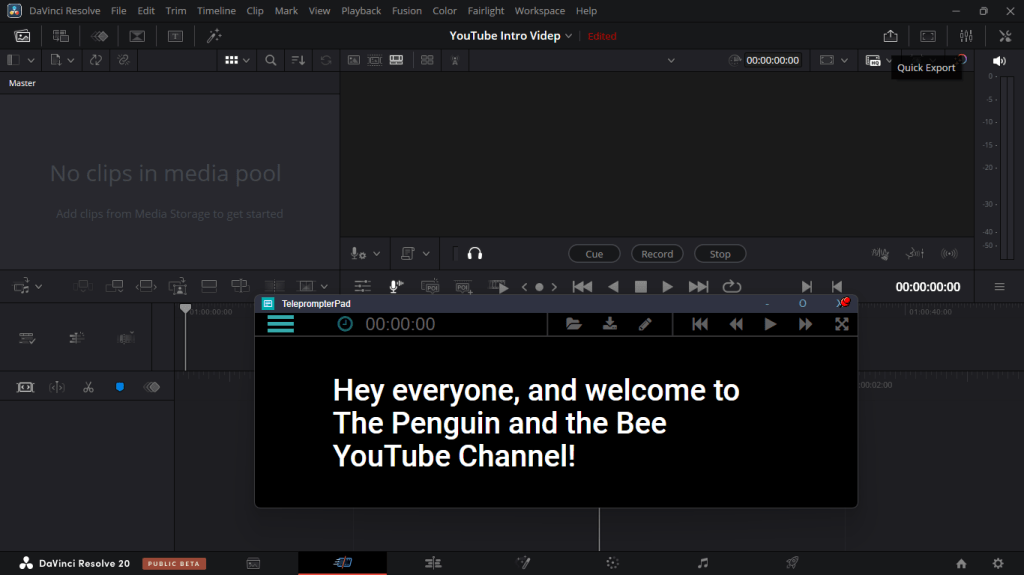
You simply open up your script (it supports several file formats), adjust your font size and scroll speed, and off you go. There are other settings too, but for me, those were the main ones. You can edit your script directly in the app, save it as a .txt file, and even format your text with bold, underlining, highlights, and different colours – especially handy if you’re working with multiple speakers and want to assign sections.
All in all, it’s a solid tool for something completely free.
I’ve been working on the script for my YouTube channel intro for a few days, and this morning, I recorded the voice-over in just two takes. Is it perfect? No. But I’m not exactly aiming for an Oscar here. If I found the text was running away from me a little bit as I took a breath and redid a line, I simply clicked on the screen to pause the scrolling. I can edit out the line I fluffed very easily in DaVinci.
Another handy tool is DeskPins, and what that does is allow you to Pin a window so it will remain on top of other programs that are running.
It’s opensource software and once installed sits in the system tray/notification area on your windows task bar. You then simply click on it, and then on the window(s) you want to remain on top. Using this I can pin TeleprompterPad to always be on top, but still access all the controls I need to in DaVinci Resolve.
To remove, hover over the pin with your mouse and click on it.
 Penguin and the Bee